
Getting clicks from Google Ads is only one part of running a successful advertising campaign.
The real goal is to attract the right people, generate qualified leads or sales, and turn advertising spend into measurable business results.
A campaign can receive hundreds of clicks and still generate very few enquiries. On the other hand, a well-structured campaign can focus its budget on searches that closely match your products or services.
So, how do you build a Google Ads campaign that focuses on conversions?
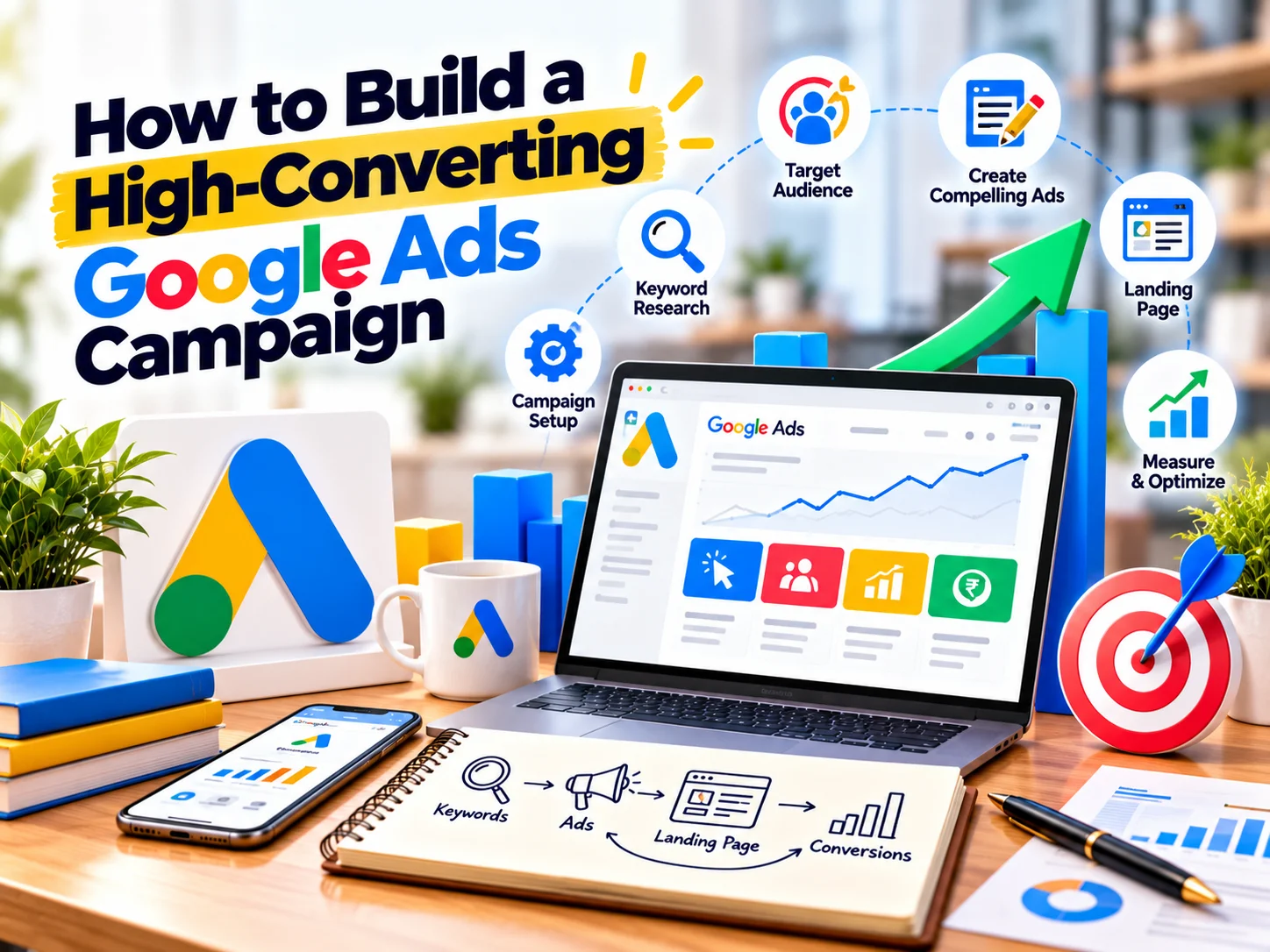
The process starts with a clear objective and continues through keyword research, campaign structure, ad copy, landing pages, conversion tracking, bidding, and continuous optimisation.
What Is a High-Converting Google Ads Campaign?
A high-converting Google Ads campaign connects several elements:
Right audience → Relevant keyword → Useful ad → Relevant landing page → Clear action → Measurable conversion
If one part of this journey breaks, your campaign can lose potential customers.
For example, you may target the right keyword but send visitors to a generic homepage. The ad may receive clicks, but visitors may not find the information they expected.
Therefore, every part of your campaign should support the same customer journey.
1. Start With a Clear Campaign Goal
Before choosing keywords or writing advertisements, define what you want the campaign to achieve.
Your objective could be:
- Generate leads
- Increase online sales
- Get phone calls
- Generate enquiries
- Increase bookings
- Promote a service
- Drive product purchases
- Increase sign-ups
Google Ads allows advertisers to select campaign goals such as sales, leads, or website traffic. Your chosen goal influences the campaign setup and optimisation options available to you.
However, avoid using vague objectives such as:
“Get more traffic.”
Instead, define the business outcome.
For example:
“Generate qualified enquiries for our website development service.”
This gives your campaign a much clearer direction.
2. Define Your Target Audience
You need to understand who you want to reach before deciding what to advertise.
Consider:
- Location
- Age group, where relevant
- Business type
- Customer needs
- Search behaviour
- Buying intent
- Budget
- Product or service requirements
For example, a company selling industrial machinery may target business decision-makers searching for specific equipment.
A local salon may focus on customers searching for services within a particular geographic area.
The audience determines your keywords, messaging, landing pages, and campaign settings.
3. Choose the Right Campaign Type
Google Ads offers different campaign types for different marketing objectives.
For example:
Search Campaigns
Search campaigns can reach people actively searching for products or services on Google.
Display Campaigns
Display campaigns can help businesses reach audiences while they browse websites, apps, and other Google properties.
Performance Max
Performance Max campaigns can distribute ads across multiple Google channels and use Google’s automated systems to help optimise toward business goals.
Video Campaigns
Video campaigns can help businesses communicate through video across Google’s video inventory.
The right campaign type depends on your objective, audience, creative assets, sales cycle, and available conversion data.
For businesses focused on capturing existing search demand, Search campaigns can be particularly relevant because they reach people actively looking for specific products or services.
4. Conduct Intent-Focused Keyword Research
Keywords determine which searches can trigger your advertisements.
However, do not select keywords based only on search volume.
Focus on search intent.
For example:
“What is website development?”
has informational intent.
Meanwhile:
“website development company Bangalore”
has stronger commercial intent.
A person searching for the second phrase may already be evaluating providers.
Therefore, identify keywords across different stages of the buying journey.
Informational Keywords
- What is SEO?
- How does Google Ads work?
- Website development guide
Commercial Keywords
- Best SEO services
- Website development company
- Google Ads agency
High-Intent Keywords
- Hire SEO agency
- Website development company near me
- Google Ads management agency
Your campaign structure should reflect these differences.
5. Group Related Keywords Together
Avoid putting every keyword into one large ad group.
Instead, organise closely related keywords into tightly themed groups.
For example, a website development campaign could include:
Ad Group: Business Website
- business website development
- business website company
- business website development services
Ad Group: Ecommerce Website
- ecommerce website development
- ecommerce website company
- ecommerce development services
Ad Group: WordPress Website
- WordPress website development
- WordPress development company
- WordPress website services
Google recommends organising Search campaigns into specific ad groups with closely related keywords and relevant advertisements.
This structure helps you create more relevant ads for each search theme.
6. Use Match Types Carefully
Google Ads provides keyword match options that influence which searches can trigger your ads.
Common options include:
- Broad match
- Phrase match
- Exact match
Negative keywords also help exclude searches that are not relevant to your business.
For example, if you sell premium website development services, searches containing terms such as “free website builder” may not match your intended audience.
Review your search terms regularly and add negative keywords when appropriate.
This helps reduce wasted spend and improve traffic quality.
7. Write Ads That Match the Search
Your advertisement should immediately connect with the user’s search.
Suppose someone searches:
“SEO agency Bangalore”
Your advertisement should clearly communicate that you provide SEO services in Bangalore rather than using a generic message.
A relevant ad might highlight:
- SEO Services
- Local SEO
- Technical SEO
- SEO Strategy
- Experienced Team
- Request a Consultation
Google recommends creating ads that directly relate to what customers are looking for and organising keywords into relevant ad groups.
Relevance matters because the user should immediately understand what your business offers.
8. Use Responsive Search Ads Effectively
Responsive Search Ads allow you to provide multiple headlines and descriptions.
Google’s systems can combine these assets into different ad variations.
For example, your headlines might focus on:
Headline 1:
Performance-Driven SEO Services
Headline 2:
Grow Your Google Visibility
Headline 3:
SEO Strategy for Growing Brands
Headline 4:
Get a Free SEO Consultation
Descriptions can then explain:
- What you offer
- Who you help
- Your key differentiators
- What action users should take
Google currently recommends using responsive search ads and suggests having at least two responsive search ads with Good or Excellent Ad Strength per ad group.
Use different messages to test different value propositions rather than repeating the same statement.
9. Make Your Landing Page Match the Ad
This is one of the most important parts of a conversion-focused campaign.
If your advertisement promotes:
Google Ads Management
the landing page should immediately discuss Google Ads management.
Do not send users to a generic homepage unless that page genuinely provides the information they need.
The landing page should reinforce the promise made in the advertisement.
For example:
Ad:
Google Ads Management for Growing Businesses
Landing Page:
Google Ads Management Services
This creates a smoother journey from search to conversion.
Google also recommends ensuring that the landing page reflects what the advertisement promises because visitors may leave when they do not find the expected information.
10. Create a Clear Landing Page Structure
A conversion-focused landing page should answer important questions quickly.
A useful structure can include:
Strong headline
Clearly explain what you offer.
Supporting statement
Explain the key benefit.
Relevant proof
Show testimonials, case studies, certifications, experience, or other evidence where applicable.
Benefits
Explain how the service or product helps customers.
Process
Show what happens after the visitor contacts you.
FAQs
Answer common concerns.
Call to action
Make the next step obvious.
For example:
Get Your Free Consultation
or
Request a Quote
Avoid overwhelming visitors with too many competing CTAs.
11. Make Your CTA Clear
Your call to action should tell visitors what to do next.
Examples include:
- Get a Quote
- Book a Consultation
- Request a Callback
- Buy Now
- Schedule a Demo
- Get Started
- Contact Our Team
The CTA should match the visitor’s stage in the buying process.
For example, a high-value B2B service may use:
Book a Consultation
while an ecommerce website may use:
Shop Now
12. Set Up Conversion Tracking Before Spending Heavily
You cannot properly optimise a campaign if you do not know what counts as a successful outcome.
Google Ads conversion tracking can measure valuable actions such as purchases, sign-ups, phone calls, and leads.
Depending on your business, conversions could include:
- Contact form submissions
- Phone calls
- WhatsApp enquiries
- Purchases
- Demo requests
- Appointment bookings
- Newsletter registrations
- Quote requests
Track the actions that actually matter to your business.
Do not treat every website interaction as a primary conversion.
13. Assign Value to Important Conversions
Not every lead has the same business value.
For example:
A general enquiry may be worth less than a qualified sales lead.
Similarly, one ecommerce purchase may be worth ₹500 while another is worth ₹10,000.
Where appropriate, assign meaningful conversion values.
Google notes that conversion values can help advertisers understand and optimise toward the business impact of campaigns rather than simply counting conversions.
This gives your optimisation strategy more context.
14. Choose a Bidding Strategy That Matches Your Goal
Your bidding strategy should support the campaign objective.
Depending on the campaign and available data, Google Ads provides automated bidding strategies designed around objectives such as clicks, conversions, or conversion value.
For example:
Traffic-focused objective → Click-oriented bidding may make sense.
Lead-generation objective → Conversion-focused bidding may be appropriate when sufficient conversion data exists.
Ecommerce objective → Conversion value or ROAS-focused strategies may be relevant when reliable revenue tracking is available.
Do not change bidding strategies constantly.
Give the campaign enough time and data to evaluate performance before making major changes.
15. Use Ad Assets
Ad assets can provide additional information and ways for users to interact with your advertisement.
Useful assets can include:
- Sitelinks
- Callouts
- Structured snippets
- Images
- Call assets
- Location assets
- Price assets
- Promotion assets
Google recommends using multiple asset types and currently suggests at least four asset types for Search campaigns.
Sitelinks can also send users directly to relevant pages.
For example:
Services | About Us | Case Studies | Contact
This gives users additional paths to explore your business.
- Consider Location and Schedule
If your business serves specific locations, make your targeting reflect that.
For example, a local service business may focus its campaign on:
- Bangalore
- Mumbai
- Hyderabad
- Chennai
A national business may use broader geographic targeting.
You can also review performance by:
- Location
- Device
- Day
- Time
- Audience
- Search term
Google recommends reviewing these performance dimensions when evaluating campaign results.
This data can help you identify where your campaign performs differently.
17. Optimise for Mobile Users
Many people discover businesses through mobile devices.
Therefore, your landing page should work smoothly on smartphones.
Check:
- Page loading speed
- Font size
- Button size
- Form usability
- Navigation
- Image sizing
- CTA visibility
- Mobile layout
Google specifically recommends making websites and ads mobile-friendly.
A user should be able to understand your offer and complete the desired action without struggling with the page.
18. Monitor Search Terms
Your keyword list does not tell you everything people actually search.
Review the search terms that trigger your advertisements.
Look for:
Relevant searches
These may reveal additional keyword opportunities.
Irrelevant searches
These may become negative keywords.
High-intent searches
These can reveal phrases that deserve dedicated ad groups or landing pages.
Unexpected searches
These can provide insights into how customers describe their problems.
Search-term analysis helps you continuously improve campaign relevance.
19. Test Different Messages
Do not assume you know which message will work best.
Test different angles.
For example:
Benefit-focused
Get More Qualified Leads From Google
Expertise-focused
Google Ads Management by Experienced Specialists
Problem-focused
Getting Clicks but Not Enough Leads?
Offer-focused
Book a Google Ads Consultation
Keep the underlying offer consistent while testing different messages.
Then use performance data to understand which messaging resonates with your audience.
20. Track Business Results, Not Just Clicks
Clicks are useful, but they are not the final goal for most conversion campaigns.
Monitor metrics such as:
- Impressions
- Click-through rate
- Cost per click
- Conversion rate
- Cost per conversion
- Conversion value
- Return on ad spend
- Qualified leads
- Sales
- Revenue
Google identifies conversions as one of the key metrics for understanding whether Search campaigns achieve valuable business outcomes.
For lead-generation campaigns, also connect Google Ads data with your sales process where possible.
A lead that submits a form is not necessarily a qualified customer.
21. Optimise Your Campaign Regularly
Google Ads requires ongoing management.
Review:
- Search terms
- Keywords
- Negative keywords
- Ad performance
- Landing pages
- Conversion tracking
- Bidding
- Budget allocation
- Locations
- Devices
- Conversion quality
However, avoid changing everything at once.
Make informed changes and monitor what happens.
This makes it easier to understand which adjustments influence performance.
22. Avoid These Common Google Ads Mistakes
Sending All Traffic to the Homepage
A homepage may not provide enough information for a specific search.
Use relevant landing pages whenever possible.
Targeting Too Many Unrelated Keywords
Broad targeting can make your ads less relevant.
Organise keywords around clear themes.
Ignoring Negative Keywords
Irrelevant searches can consume budget.
Review search terms regularly.
Tracking Only Form Submissions
Track the actions that genuinely matter to your business.
Changing Campaigns Too Frequently
Constant changes can make performance harder to evaluate.
Writing Generic Ad Copy
Your advertisement should clearly explain why the user should consider your offer.
Ignoring the Landing Page
A good ad cannot compensate for a confusing landing page.
Measuring Only Clicks
Traffic is useful, but conversions and business outcomes provide a clearer picture of campaign performance.
A Simple Google Ads Campaign Framework
You can use this framework when building a new campaign:
Step 1: Define the objective
Choose sales, leads, traffic, or another measurable business goal.
Step 2: Understand the audience
Identify who you want to reach and what they are searching for.
Step 3: Research keywords
Focus on relevant search intent.
Step 4: Structure campaigns and ad groups
Keep closely related keywords together.
Step 5: Write relevant ads
Match your messaging to the search and landing page.
Step 6: Build the landing page
Give visitors the information they need and make the CTA clear.
Step 7: Set up conversion tracking
Measure valuable actions.
Step 8: Select bidding and budget settings
Align them with your objective and available data.
Step 9: Add relevant assets
Provide additional information and actions.
Step 10: Launch and monitor
Review search terms, conversions, costs, and business results.
Step 11: Optimise continuously
Use performance data to improve targeting, ads, landing pages, and bidding.
Frequently Asked Questions
Q. How much should I spend on Google Ads?
A. There is no universal budget that works for every business. Your budget should consider keyword competition, customer value, conversion rate, sales cycle, and business goals.
Q. How long does Google Ads take to generate results?
A. Ads can begin generating traffic soon after approval, but meaningful optimisation requires sufficient performance data. Google notes that bidding may take time to fully optimise after launch.
Q. Is Google Ads better than SEO?
A. Google Ads and SEO serve different purposes. Paid search can provide advertising visibility for selected searches, while SEO focuses on earning organic visibility. Many businesses use both as part of a broader digital marketing strategy.
Q. Why are my Google Ads getting clicks but no leads?
A. Possible reasons include irrelevant traffic, weak ad messaging, poor landing-page experience, unclear CTAs, incorrect targeting, or conversion tracking problems.
Start by checking the search terms, landing page, conversion tracking, and lead quality.
Q. Should I use broad match keywords?
A. Broad match can help expand reach, particularly when paired with Google’s automated systems and conversion-focused bidding. However, the right setup depends on your campaign, conversion data, controls, and business goals. Google’s current Search guidance recommends evaluating broad match alongside AI-powered Search features and Smart Bidding.
Q. How do I improve my Google Ads conversion rate?
A. Start with the fundamentals:
- Target relevant searches
- Improve ad relevance
- Use strong landing pages
- Make CTAs clear
- Track conversions correctly
- Remove irrelevant traffic
- Test messaging
- Review performance regularly
Final Thoughts
A high-converting Google Ads campaign does not start with a large advertising budget.
It starts with the right customer, the right search, the right message, and the right landing page.
Define your business objective first. Then research search intent, organise relevant keywords, create useful advertisements, build focused landing pages, and track the actions that matter.
Once your campaign launches, keep learning from the data.
Review search terms. Improve your ads. Refine your targeting. Test your landing pages. Monitor conversion quality. Adjust your strategy based on actual business results.
Google Ads works best when advertising, landing pages, analytics, and business goals work together.
Build Better Google Ads Campaigns With CreativeKatta
Running Google Ads is more than setting a budget and choosing a few keywords.
CreativeKatta helps businesses build a connected digital marketing strategy through Google Ads, SEO, website development, social media marketing, creative design, brand identity, packaging design, and video editing.
From campaign planning and ad creatives to landing pages and conversion-focused digital experiences, we help businesses turn online visibility into meaningful customer actions.
Ready to build a more focused Google Ads campaign? Talk to CreativeKatta today.